What Makes API Documentation Work?


Have you ever noticed how some APIs click while others leave you scratching your head? The difference usually comes down to one thing: how well they explain themselves. After examining the documentation strategies of five tech giants — Stripe, Twilio, GitHub, Spotify, and X, clear patterns show that they transform confusing code into delightful developer experiences.
The Foundation Every Great API Documentation Builds On
Authentication You Can Actually Follow
Authentication is where developers form their first impression of your API. All five platforms understand that authentication is your first impression. But instead of throwing technical jargon at you, they walk you through the process like a patient teacher. Stripe handles this well by showing you exactly what your API keys look like — test mode and live mode secret keys both start withsk_, making them immediately recognizable as Stripe API keys. They even include working test keys in their examples so you can try calls immediately without setting up an account first.
When developers can authenticate successfully on their first try, they’re more likely to keep going. When they can’t, they’ll probably look elsewhere.
Examples That Work Out of the Box
There’s a big difference between code examples and working code examples. The best documentation gives you something you can copy, paste, and run right away. Complete curl commands with all required parameters. Sample code in multiple languages that actually compiles. Expected responses so you know what success looks like.
This approach builds confidence fast. When your first API call works, you feel ready to tackle harder integrations.
Error Messages That Guide Instead of Frustrate
Every developer hits errors. Great documentation turns those moments into learning opportunities instead of frustration.
Twilio does this particularly well. Their error responses include:
- An HTTP status code
- A clear description of what went wrong
- A Twilio-specific error code
- A link to documentation about that specific error
When you get a 400 error with code 21211, you also get a Learn more pointing straight to help for that exact problem. That's the difference between spending 5 minutes fixing an issue and spending an hour.
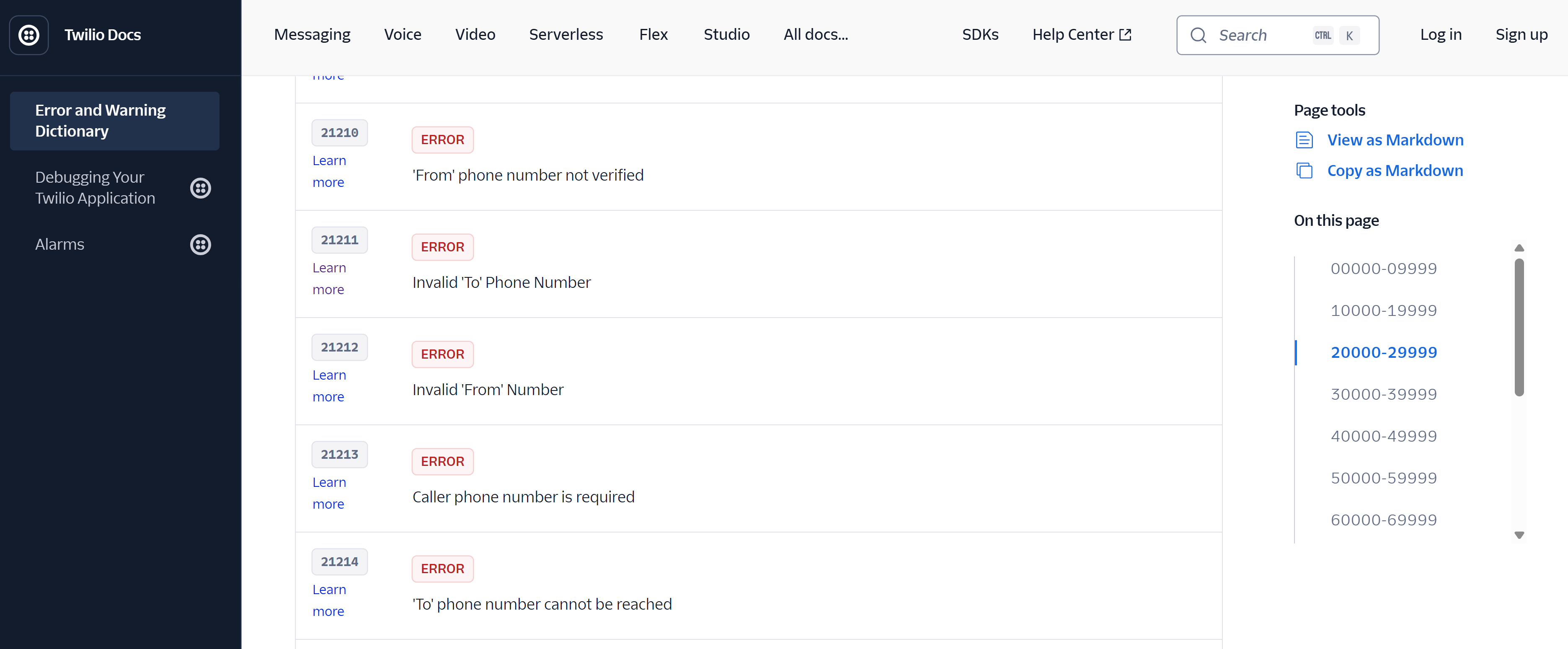
Error codes in Twilio docs
How Great Documentation Organises Information
Building Knowledge Step by Step
The most effective API documentation follows a careful progression from simple to complex. Think of it like learning a new language; you start with basic vocabulary before attempting complex sentences. All five platforms structure their content this way, beginning with fundamental concepts before diving into advanced features. This layered approach serves everyone. New developers get a gentle introduction that builds confidence, while experienced users can jump directly to the specific reference they need. It’s about meeting people where they are.
Learning by Doing
Modern API guides go beyond simple explanations by offering hands-on experiences. Stripe’s documentation features live code editors, allowing you to modify parameters and view results instantly. GitHub’s built-in testing allows you to experiment with endpoints directly through your browser. These features turn static documentation into engaging, practical tutorials that help developers understand through experimentation.
What Makes Documentation Memorable
Predictable Patterns
Once developers understand how one part of your API works, they should be able to predict how other parts behave. Consistent naming conventions matter. Standard response formats matter. Predictable error handling matters.
Stripe follows this principle throughout their API. Authentication works the same way for every endpoint. Error responses follow the same structure. Pagination works consistently across all list operations. This consistency reduces mental overhead and makes the entire system feel more intuitive.
Context That Connects the Dots
Generic examples are forgettable. Real scenarios stick in your mind. Instead of showing you how to create a random user record, great documentation shows you how to build a complete registration workflow, handle edge cases, and integrate with other system components.
When you provide context, developers understand not just what an API does, but when and why they’d use it.
The Human Element
Writing That Feels Like a Conversation
Technical documentation doesn’t have to sound robotic. The most effective guides read like explanations from a knowledgeable colleague. They anticipate your questions, acknowledge when something might be tricky, and celebrate when you get things right.
Understanding Developer Frustrations
Great documentation writers remember what it’s like to be stuck on a problem at midnight with a looming deadline. This empathy shows up in helpful tips, common mistake warnings, and detailed troubleshooting sections.
The Real Secret
Creating documentation that developers enjoy using is about recognising that behind every API call is a person trying to solve a real problem. The best documentation helps them succeed as quickly and smoothly as possible.
When you combine logical structure, working examples, helpful error guidance, and conversational explanations, you create something special. You build a bridge between what your API can accomplish and what developers want to achieve.
The platforms that get this right — Stripe, Twilio, GitHub, Spotify, and X don’t just document their APIs. They create experiences that make developers feel capable and confident. That’s the real difference between APIs that get adopted and those that get abandoned.
Remember this the next time you’re writing documentation: you’re not just describing technical features. You’re potentially making someone’s workday better or helping them solve a problem they’ve been wrestling with for hours. That opportunity is worth the extra effort to get it right.