How to Write Documentation for Both Humans and AI Retrieval Systems

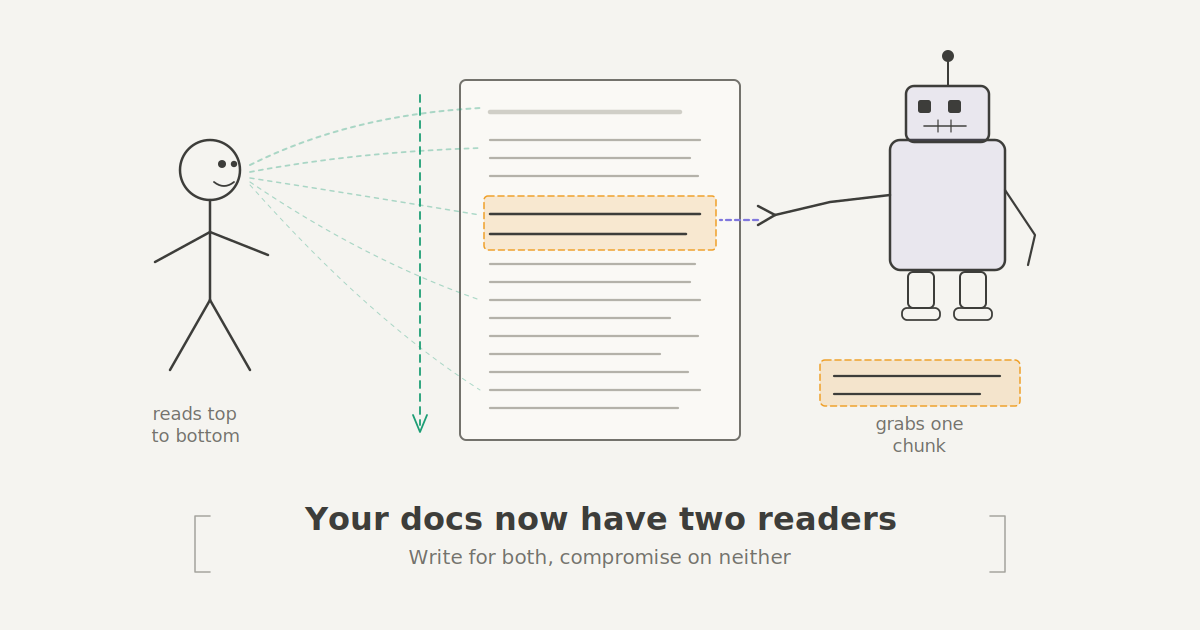
Your documentation has a new reader, and it doesn't have eyes. AI tools like chatbots, IDE assistants, and Retrieval-Augmented Generation (RAG) systems now stand between your carefully written docs and the engineer who needs them. These tools chop your pages into chunks, search for relevant matches, and generate responses before a human ever visits the actual page.
That means your docs now serve two audiences: the person trying to solve a problem, and the machine trying to extract the right answer. This changes how documentation should be structured. Not what you write but how you arrange it. Here's how to structure documentation that works for both.
Why Documentation Structure Matters
Picture this. A backend engineer asks the internal chatbot how to rotate API keys. The accurate answer exists in the docs. But it's split across two pages. "Security Overview" explains the concepts. "Key Management" has the actual steps.
The chatbot grabs the overview because the heading matches the query. It misses the step-by-step instructions entirely because those live under a vague heading on a separate page. The engineer gets a response that says something like "refer to your organization's security policy."
Ten minutes wasted. The information was actually there. The structure buried it.
This kind of failure isn't rare. It's the natural result of documentation written for linear reading in a world that increasingly relies on retrieval. And fixing it requires being more deliberate about where answers live within each section.
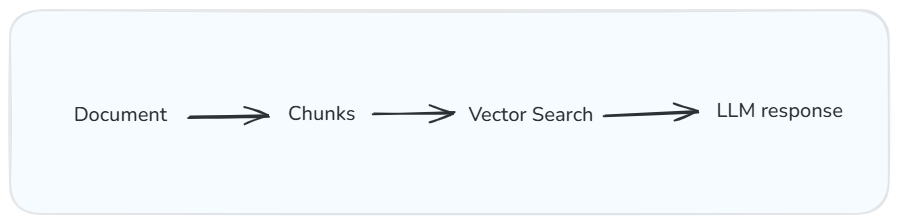
How RAG systems process your documentation: chunk, search, generate. The quality of the output depends on how well each chunk stands on its own.
What Each Reader Actually Needs
The Human Reader
When someone opens a doc page, they have a problem. They want to solve it without reading more than they have to, but they also need enough context to understand why a solution works.
Good documentation explains ideas that build on each other. Headings, spacing, and code blocks reduce the mental effort of parsing information. The Nielsen Norman Group's research on the inverted pyramid confirms what most tech writers already feel: people scan first, read second. They want the core idea before the deep implementation.
This is the principle of progressive disclosure. Start with the simplest version of the explanation and layer complexity gradually. It reflects how people actually learn.
The Machine Reader
A chatbot or RAG tool reads your docs completely differently. It doesn't start at the top and build understanding. It breaks your page into chunks, searches for the most relevant match to a query, and uses whatever it finds to generate a response.
This means each section needs to stand on its own. If a section depends on context from three sections earlier, the retrieval system will respond without that context, and the reader gets a confusing or incomplete answer.
RAG systems perform better when they get self-sufficient sections with clear headings and consistent metadata that signals what each page covers.
A quick example. An engineer asks an AI assistant: "How do I roll back a failed deployment?"
Consider two versions of the docs:
Version A — Page title: Release Workflow. Section heading: Post-deployment considerations.
Version B — Page title: Roll back a failed deployment. Section heading: How to roll back a deployment. Tags: deployment, rollback, incident response.
Version B makes it easy for both humans and machines to find the right answer.

Same document, two completely different reading patterns. One reads linearly. The other grabs and runs.
Where the Two Readers Clash
Some best practices for human readers actively trip up retrieval systems. Progressive disclosure is the clearest example. Humans benefit from context before the answer, and this feels natural, like a good explanation from a colleague. But a retrieval system doesn't care about your buildup. It wants the answer in the first sentence. If you lead with context and bury the solution four paragraphs down, the system grabs your preamble and misses the instructions.
Say you've written a section on configuring retry policies. A human reader benefits from the first paragraph explaining why retry policies matter. A retrieval system just needs: "Set maxRetries to 3 and backoffMultiplier to 2.0 in your service config."
Both readers need that information. They just need it in a different order.
The fix is to restructure each section so the answer comes first, followed by the context. Journalists have done this for over a century and it's called the inverted pyramid. The machine gets its clean extraction target. The human gets their narrative. You just flip the sequence.
Five Structural Rules That Serve Both Readers
You don't need to rewrite everything. These are targeted changes that make a real difference.
1. Every Section Should Answer One Specific Question
Before writing a section, ask: what question is this answering? Not vaguely. Not "this section is about deployments." More like: How do I deploy a container to Amazon ECS?
When a section maps to one question, human readers can scan the table of contents and jump straight to what they need. Retrieval systems can match the section directly to a query without parsing through unrelated material. The moment you start mixing topics, the deployment steps tangle with monitoring setup and a detour into logging, then you've made the section harder to scan and harder to retrieve. Split them up.
The Diátaxis framework applies a similar principle at the page level, separating documentation into tutorials, how-to guides, reference, and explanation. The idea scales down to individual sections, too.
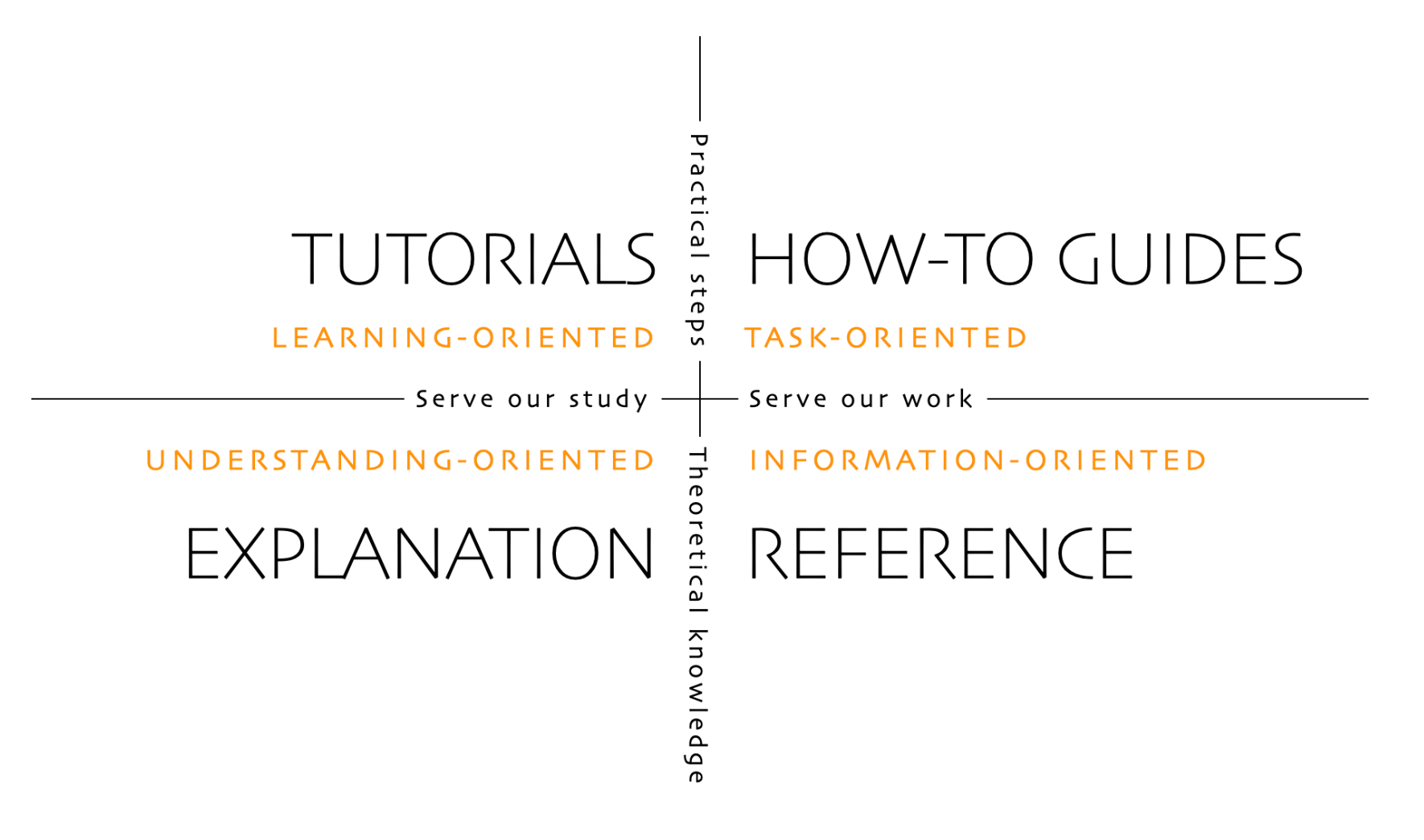
The Diátaxis Framework
2. Write Headings Like Search Queries
There's a difference between a heading that names a category and one that names a problem. "Troubleshooting" is a category. "How to fix a failing Kubernetes deployment" is something an engineer would actually type into a search bar.
Vague headings like "Advanced Usage" or "Additional Configuration" force the reader to open the section and scan through it to decide if it's relevant. They also make it nearly impossible for a retrieval system to match the section to a query.
The Google developer documentation style guide recommends task-based headings that describe what the reader will accomplish. That advice serves AI retrieval systems just as well.
3. Open Every Section with the Answer
This is the highest-impact change you can make, and it'll feel wrong at first. Every writing instinct says to set the stage before delivering the punchline. Resist it. Documentation isn't a mystery novel.
Open with the key idea in the first sentence: "To restart a Kubernetes pod, delete the pod and let the controller create a replacement."
The reader immediately knows they're in the right place. The retrieval system has the correct answer in the first chunk it grabs. Then use the rest of the section for explanation, context, and examples. You've moved the answer to the front of the line.
This mirrors the inverted pyramid structure that's been the backbone of news writing since the telegraph era.
4. Make Every Code Example Self-Contained
An engineer arrives at your code example from a chatbot response. They didn't read the setup section three scrolls up. They don't have the environment variables you configured in step two. They're staring at a function call to something defined somewhere else.
Phrases like "as configured in the previous section" or "using the client we created earlier" are red flags. They mean your example only works for someone reading linearly from the top. Everyone else, including every retrieval system, is stranded.
Include everything needed to understand or run the example right there: import statements, variable definitions, and configuration values. Yes, it means some repetition. But that's worthwhile.
5. Write Metadata Like You're the One Searching
Most teams treat frontmatter metadata as an afterthought. A title, maybe a description, some tags somebody picked six months ago. But metadata is the first thing search systems and retrieval tools use to decide if your page is relevant.
Not "ECS Deployment Guide" — that's your internal label. Instead: "Deploy a Node.js Application to Amazon ECS." That's what someone would actually type.
You could structure every section perfectly, but none of it matters if the retrieval system can't find the page in the first place. Metadata is what gets your docs into the room.
Before and After
Here's the same documentation written two ways.
Before (traditional narrative structure):
Working with Retry Policies
Retry policies are an important part of building resilient services. When a request fails due to a transient error, such as a network timeout or a temporary service outage, a retry policy determines whether and how the system attempts the request again.
There are several factors to consider when configuring retries, including the maximum number of attempts, the delay between attempts, and whether to use exponential backoff.
To configure a retry policy, set
maxRetriesto 3 andbackoffMultiplierto 2.0 in your service configuration file.
A retrieval system grabbing the first paragraph gets a general explanation with zero actionable content. The actual instruction is buried at the bottom.
After (structured for both readers):
How to Configure a Retry Policy for Transient Failures
Set
maxRetriesto 3 andbackoffMultiplierto 2.0 in your service configuration file. This ensures failed requests are retried with increasing delays, preventing cascading failures.Retry policies handle transient errors like network timeouts and temporary outages. Without them, a single failed request surfaces as a user-facing error even when the issue resolves in milliseconds. Exponential backoff — doubling the wait between each retry — gives the downstream service time to recover without piling on additional load.
Same information. Same depth. The answer just comes first. A retrieval system grabs the solution on the first pass. A human gets the answer immediately and reads on to understand why.
Another example can be seen in this image below:
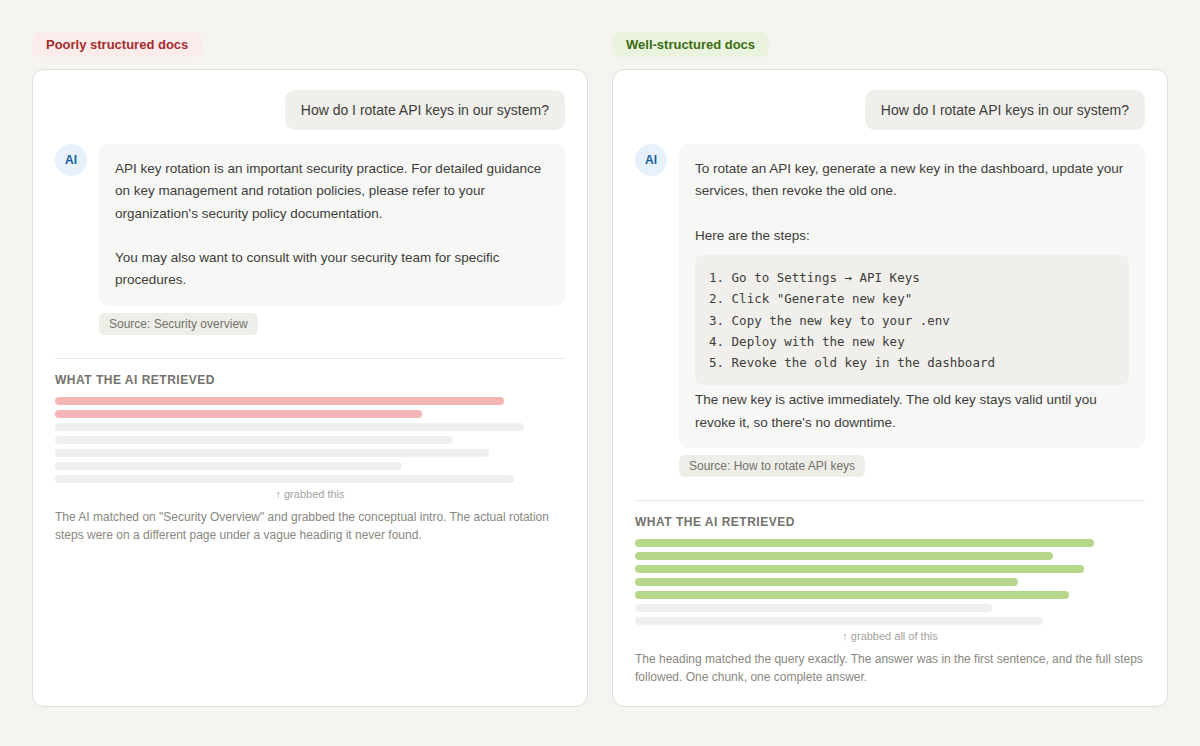
The difference between a useless chatbot response and a helpful one often comes down to where the answer sits in the section
Start with One Page
Don't overhaul everything at once. Pick your most-linked or most-asked-about page. Audit it against these five rules. Restructure it. Watch whether the chatbot returns better answers and if engineers stop asking the same follow-up questions. Then do the next page.
Documentation is infrastructure. The teams that structure it for both human and machine readers are building a knowledge base that actually scales.